Is Your Flutter App Ready for iPhone Duo?
- David Serrano Canales
- October 30, 2026
Table of Contents
iPhone Duo, Apple’s first foldable iPhone, went on sale on October 23. It raises many questions for those of us who develop apps: what will it mean for development? Will we be required to adapt our apps to this new foldable form factor? If so, what challenges will that involve? What happens if we do not adapt them? What will they look like when the device is folded and unfolded? What tools does Flutter provide for adapting the interface?
In this article, I intend to answer all these questions quickly so that you know what is coming if you distribute apps for iOS. At the end, I will also show you a very simple way to adapt your app’s interface with little effort so that it looks good on the new iPhone Duo.
Info
📽 Video version available on YouTube
iPhone Duo changes how your app is displayed
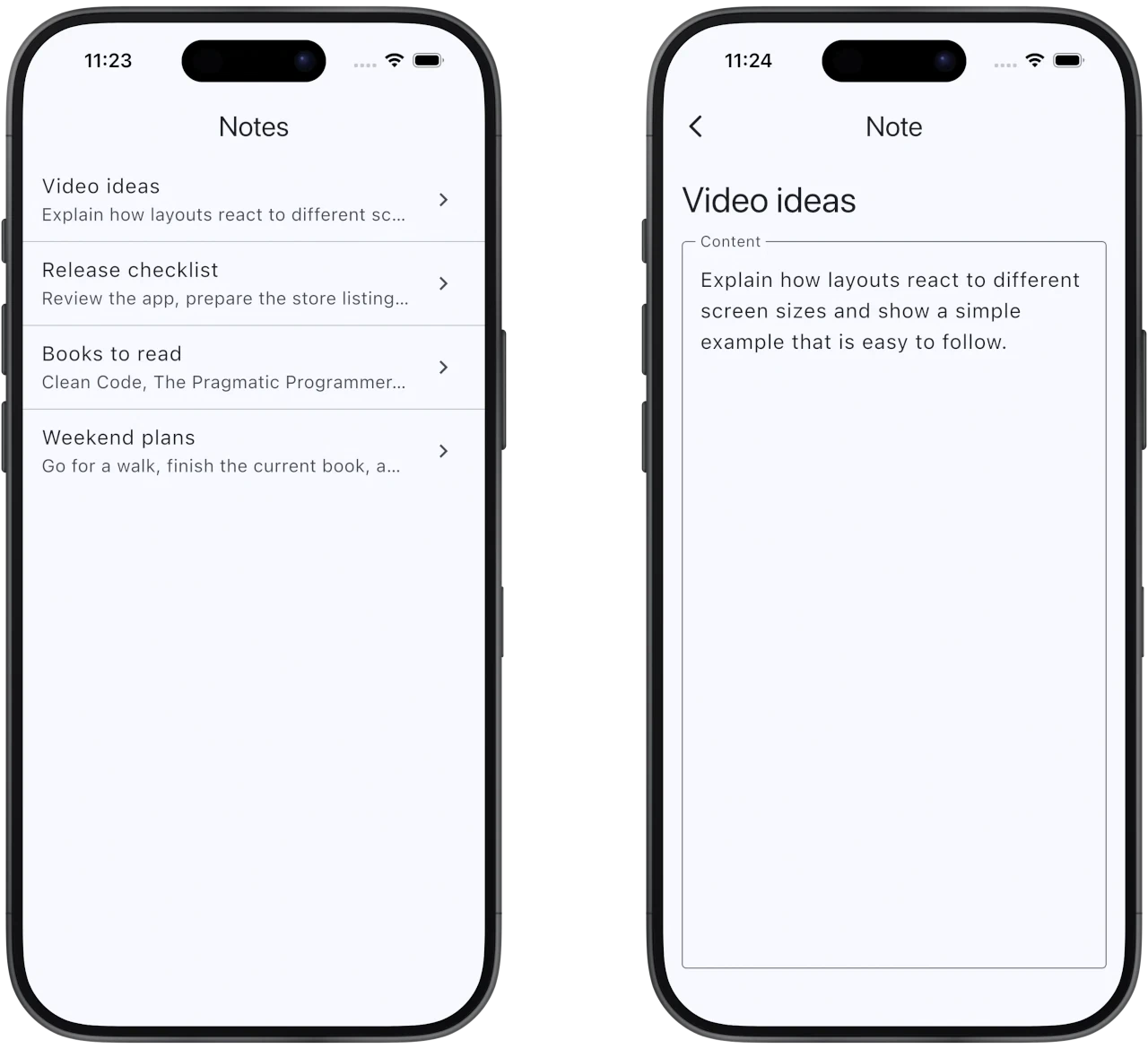
To get a clear picture of what happens when we run an app on iPhone Duo, I have prepared this extremely simple sample app. It displays a list of notes, and tapping one takes us to a screen where we can read its contents:
Now let’s see what happens when I run this same app on an iPhone Duo. First, I will show you how it looks when built with the iOS 27.1 SDK, but without making any other adjustments to the interface:
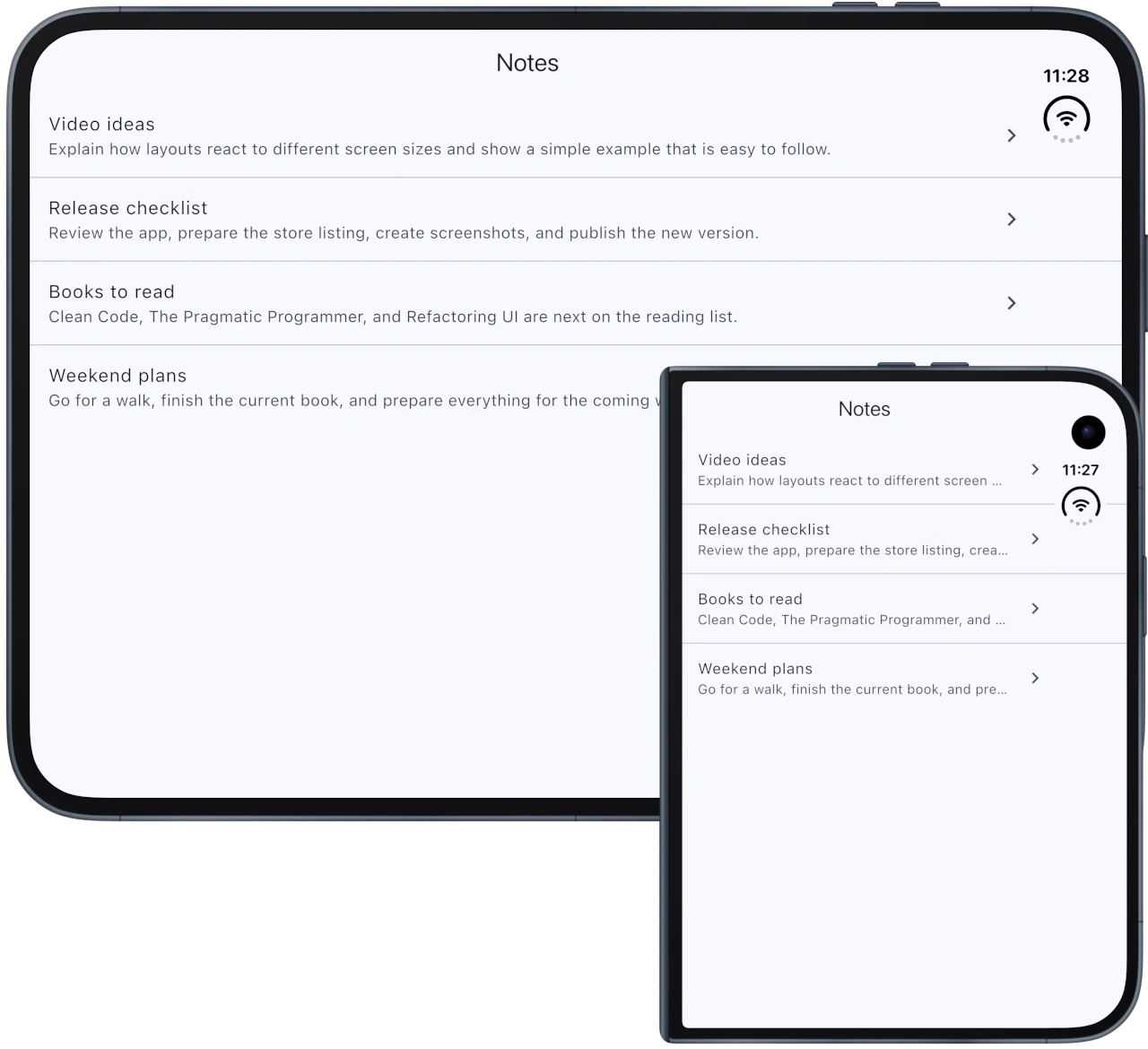
As you can see, the app resizes to fill all the available space. This is not a major problem when the device is folded because the dimensions and aspect ratio of the outer display are relatively similar to those of a conventional iPhone. However, as soon as the user unfolds it, an interface designed for a narrow smartphone window spreads across the full width of the inner display. It works, but it does not provide the best experience.
Info
By the way, the result depends on the SDK used to build the app. With the iOS 26 SDK or earlier, the system runs it in Compatibility Mode: when the device is closed, it occupies the space to the left of the status bar and camera; when opened, it keeps a size and aspect ratio similar to those of a conventional iPhone, centered on the inner display with unused space around it. With the iOS 27 SDK, the app resizes and fills most of the inner display, but still avoids the status bar area on the right. Finally, with the iOS 27.1 SDK or later, it can extend across the entire display, and native bars can be placed vertically below the status bar. The previous screenshot shows this last case.
Adapting Flutter apps to iPhone Duo
Fortunately for us, Flutter provides a large number of widgets and tools for adapting the interface, not only to iPhone Duo, but to any window size. In fact, I think the right mindset is not “I am going to adapt my Flutter app to iPhone Duo,” but rather “I am going to adapt my Flutter app to new sizes.” The idea is to abstract away from the physical device and build a responsive interface that reacts dynamically to the space available to it.
For example, with very few adjustments, we could create an adaptation like this:
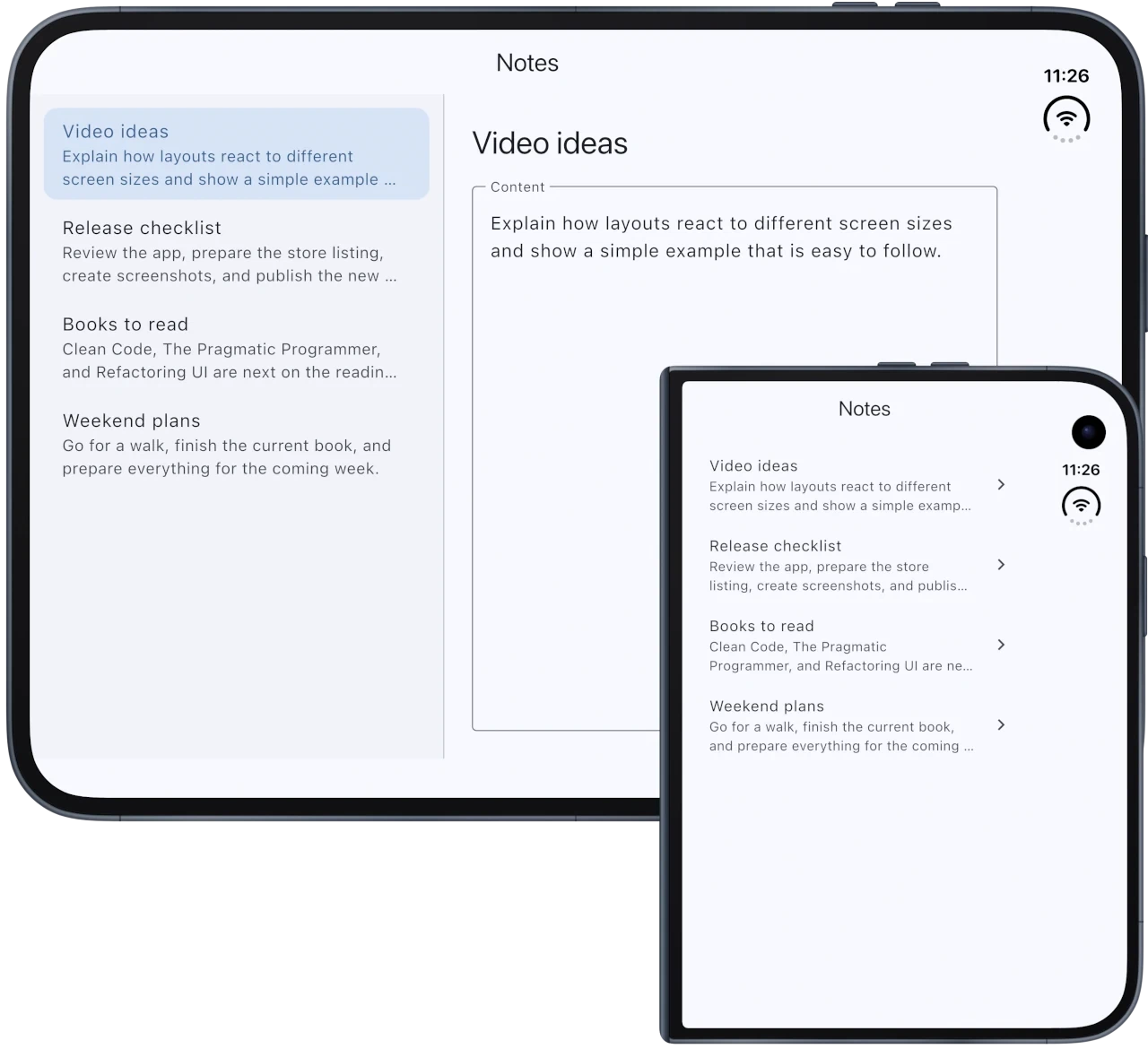
As you can see, when the Duo is folded, I keep the previous layout. When it is unfolded, I take advantage of the additional width of the inner display to show the list of notes on the left and the details of the selected note on the right.
This effect can be achieved easily by using LayoutBuilder, a widget that gives us the size constraints it receives from its parent widget. When those constraints change, for example, when the device orientation changes or when the iPhone Duo is folded or unfolded, Flutter runs its builder again, allowing us to choose the appropriate interface for the available space:
@override
Widget build(BuildContext context) {
  return Scaffold(
    appBar: AppBar(title: const Text('Notes')),
    body: SafeArea(
      top: false,
      child: LayoutBuilder(
        builder: (context, constraints) {
          if (constraints.maxWidth >= _wideLayoutWidth) {
            return _WideNotesLayout(
              notes: _notes,
              selectedIndex: _selectedNoteIndex,
              onSelected: _selectNote,
            );
          }

          return _NotesList(notes: _notes, onSelected: _openNote);
        },
      ),
    ),
  );
}
In addition to LayoutBuilder, I use SafeArea in this example to keep the content away from areas occupied by the system interface, the camera, and the rounded corners. Flutter offers many other tools for creating adaptive interfaces: MediaQuery.sizeOf() lets us check the current size of the app window; Expanded and Flexible distribute space within rows and columns; and ConstrainedBox lets us set minimum or maximum limits to prevent content from stretching too far. These are just a few examples. Flutter offers many more tools for adapting an interface to the available space.
Info
In this article, I simplify how iPhone Duo works by referring only to the “folded” and “unfolded” states, but the device can also be used partially folded and in different positions. In most cases, creating a flexible interface that adapts to the available space will be enough. However, depending on the type of app, it may make sense to create specific adaptations for some of these states.
Do I have to adapt my app to iPhone Duo? Is it worth it?
Before discussing whether it is worth adapting your app to iPhone Duo or how sophisticated the adaptation should be, let’s first look at the requirement announced by Apple that you need to keep in mind:
Requirement starting in April 2027
Starting in April 2027, apps and games uploaded to App Store Connect must be built with the iOS 27 SDK or later and set iOS 15 or later as their minimum supported version. In addition, apps built with the iOS 27.1 SDK or later must provide screenshots specifically for iPhone Duo. This does not mean that apps already published must be updated before that date. The requirement will apply the next time you upload a new build to App Store Connect, whether it is a new app or an update.
These requirements do not explicitly force you to create an interface specifically for iPhone Duo. However, requiring screenshots for the device does seem to indicate that Apple expects us to check how our apps behave on it and, at the very least, fix the most obvious adaptation issues.
So, how much effort is worth putting into this adaptation? The answer will depend greatly on the type of app and what its users expect. In my case, my apps are used mainly on smartphones, and tablets account for a tiny share of my users. It is reasonable to assume that I will not have many users with an iPhone Duo either, so I will probably make the minimum adaptations needed for my apps to work properly on it and to comply with the new requirement for device-specific screenshots.
Even so, I would not measure the effort based solely on how many users will have an iPhone Duo. If your app already has a flexible interface, achieving a reasonable result may require very few changes. If it does not, adapting the app to Duo can help you identify problems that will also appear on tablets, in resizable windows, or on future form factors. In that sense, the work can provide value beyond this device.
Conclusion
iPhone Duo is Apple’s new toy, and it gives us one more reason to review how our apps behave when they have much more space available. As I mentioned earlier, my recommendation is not to approach it as “I am adapting my app to iPhone Duo,” but as “I am adapting my app to different window sizes.” This way, the work will benefit not only this device, but also tablets and other current or future form factors.
See you next time!